
- Joined
- Aug 25, 2025
- Messages
- 597
- Pronouns
- he/him
As some have noticed, I've purposefully disabled comments on news, opting to having a thread assigned to it instead to avoid redundancy and prioritizing a forum format.
However, to do that a little of extra work is necessary:
Method 1: Assign to a thread after creating the news:
Method 2: Convert thread to news
Notes:
When viewing the article in the News tab (as opposed to the normal thread view), the thumbnail will always appear on top (and I'll ask to please always include a thumbnail so your news/article looks pretty on the listing). If this messes up the way you want for it to look on the thread view, you can make them both slightly different so the images are placed to your taste.
Btw, you don't need to create your thread in the "Article" format if you're going to assign it to a news, as this will automatically revert it's "Thread view" mode to a normal thread.
Doing those stuff requires the Publisher role I just created, @Cheela @IyoTheHelpfulWolf @Yousef @destinyduelist @Octopus congratulations you now hold this power (for any thread/news, so pls be careful ). Those who want this role too can request me.
Alternatively, instead of having the role, you can also request me when you want your article featured. (I'm still publishing anything that is posted on "Gaming News" section, unless it's a joke thread).
If there's questions let me know c:
However, to do that a little of extra work is necessary:
Method 1: Assign to a thread after creating the news:
In this way, you manually create the thread and the news separately. You create the news there:
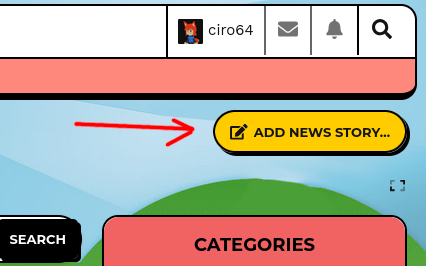
Then you assign it to your thread url:
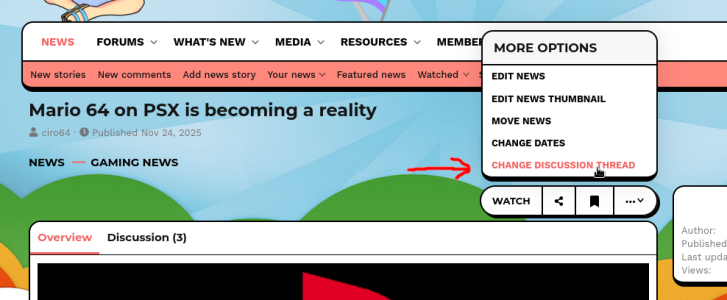
Hopefully this method should be painless
Then you assign it to your thread url:
Hopefully this method should be painless
Method 2: Convert thread to news
In this way you pick an existing thread and convert it to news directly.

Unfortunately it's not a painless method, as now the thread will now become this and truncate long texts:
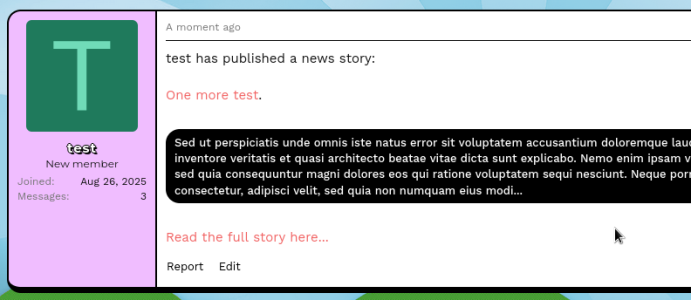
You'll have to edit the thread manually to put the content back the way it was.
Just copy and pasting everything will mess the attachments too unfortunately, you can fix this by either inserting images with their URL or reuploading the images by copying and pasting them individually.
Unfortunately it's not a painless method, as now the thread will now become this and truncate long texts:
You'll have to edit the thread manually to put the content back the way it was.
Just copy and pasting everything will mess the attachments too unfortunately, you can fix this by either inserting images with their URL or reuploading the images by copying and pasting them individually.
Notes:
When viewing the article in the News tab (as opposed to the normal thread view), the thumbnail will always appear on top (and I'll ask to please always include a thumbnail so your news/article looks pretty on the listing). If this messes up the way you want for it to look on the thread view, you can make them both slightly different so the images are placed to your taste.
Btw, you don't need to create your thread in the "Article" format if you're going to assign it to a news, as this will automatically revert it's "Thread view" mode to a normal thread.
Doing those stuff requires the Publisher role I just created, @Cheela @IyoTheHelpfulWolf @Yousef @destinyduelist @Octopus congratulations you now hold this power (for any thread/news, so pls be careful
). Those who want this role too can request me.Alternatively, instead of having the role, you can also request me when you want your article featured. (I'm still publishing anything that is posted on "Gaming News" section, unless it's a joke thread).
If there's questions let me know c: